In an era where customer experience defines brand success, having an efficient and responsive customer support system is non-negotiable. Service Cloud is the answer, providing businesses with the tools to streamline support, enhance customer satisfaction, and drive loyalty.
Service Cloud is a powerful customer service management platform developed by Salesforce. It centralizes customer interactions, streamlines workflows, and ensures that support teams can resolve customer issues quickly and effectively. Service Cloud ensures seamless customer service management, whether through email, phone, social media, or chat.
This Service Cloud Implementation Guide will walk you through its key capabilities, benefits, pricing models, and the exact steps to implement it successfully in your organization.
Key Capabilities of Salesforce Service Cloud
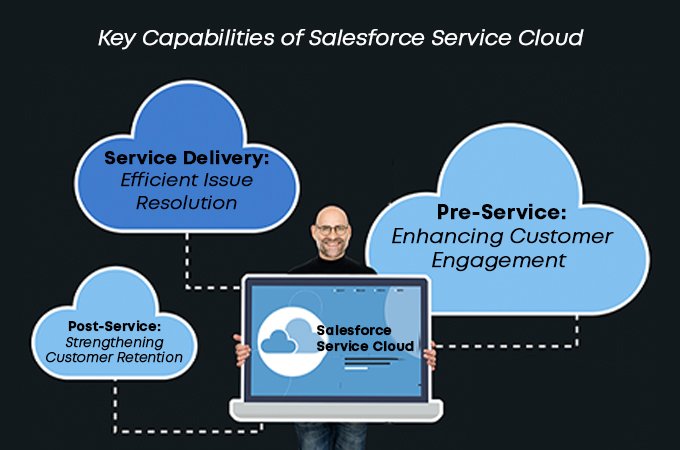
1. Pre-Service: Enhancing Customer Engagement
Omni-channel support (Email, Chat, Phone, Social Media)
Service Cloud lets businesses connect with their customer in handling their queries via all the channels available. They can manage and respond using their preferred channel, be it email, live chat, phone support, SMS, or social media platforms from a single, unified console.
Intelligent case routing
Service Cloud can smartly navigate incoming cases to the most appropriate agent based on factors such as expertise, availability, and customer priority using Salesforce Einstein. This helps in improving customer support by reducing connection time and achieving higher first contact resolution rates.
Self-service portals for customer queries
This cloud also offers a fully customisable customer portal and can be used to create communities where users can log in to find answers on their own. These portals help provide access to FAQs, product information, how-to-guides, and give access to log and track cases. This helps in resolving issues independently, reducing the burden on service agents.
2. Service Delivery: Efficient Issue Resolution
Automated workflows
Service Cloud enables automating of service processes through configurable workflows, macros, and approval processes. This includes automatically escalating and assigning cases, assigning tasks, and updating records that help in optimizing the overall workflow.
Knowledge base access
This cloud comes with a huge repository of knowledge bases that include articles, documentation, and troubleshooting guides. This helps agents resolve issues quickly and accurately. Customers can also access these resources via self-service portals that facilitate faster issue resolution.
Case management and tracking
This cloud also provides the tools required for tracking the lifecycle of customer service cases from generation to closure. Agents can not only oversee the status of each case, view past interactions, but also ensure timely follow-ups.
3. Post-Service: Strengthening Customer Retention
Customer feedback collection
Service Cloud allows organizations to gather feedback through automated surveys and follow-up emails. This helps in understanding required improvements as well as measuring customer satisfaction and net promoter score.
Case history and documentation
This cloud retains a complete record of all customer interactions, including email threads, chat logs, call notes and case resolutions. This historical data allows agents to understand past issues, personalize future support and provide consistent service.
Real-time reporting and analytics
This cloud also provides access to real-time dashboards and reports that provide insights into key performance indicators(KPIs) such as case volume, average resolution time, productivity and customer satisfaction scores. These charts help in understanding ongoing trends, forecasting support needs and making data-driven decisions.
Step-by-Step Service Cloud Implementation Guide
Do you have a customer service team in place?
Are your customer interactions centralized?
Do you require omnichannel support?
For the complete list of questions
Click here
The Service Cloud Implementation Process
1. Business Assessment
This initial step is the foundation stage where an evaluation of an organisation’s current state of customer service is conducted. Once there is a thorough understanding of how the support team currently handles customer inquiries, for e.g., through phone, email, spreadsheets, third-party systems, the volume and type of cases are analysed. Further, SLAs are assessed and the structure of the entire support team is identified.
Various operational bottlenecks such as delayed response time, high agent turnover or inconsistent case handling are recognised. Evaluation of any gaps in communication, reporting or tracking and current tools supporting scalability to understand if they restrict growth and quality.
2. Requirement Analysis
After thoroughly analysing the pre-existing systems, the next step is deciding where you want to go and how the service cloud will get you there. Channels are to be decided that will be used for support initially, which is later needed to slowly transform into omnichannel support to manage workload distribution across agents in real time. The setup for either a self-service portal or experience cloud site to deflect common queries and then plan for mobile support access, depending on remote or field-based.
Depending on the use cases and the various other factors, the kind of automation required is understood and applied.
3. Licensing Options
Salesforce offers various Service Cloud licenses depending on the requirement and scale. Choosing the right license not only ensures that you don’t overpay, but it also ensures that you do not limit yourself. There are two types of licenses based on the type of business you run. The basic license is best suited for startups or small businesses with limited channels, and there is no heavy customization needed, whereas the advanced license is for larger teams with complex needs.
Choosing the right license is a key step in your Service Cloud Implementation Guide because it ensures scalability without unnecessary costs.
Service Cloud Pricing
Salesforce Service Cloud offers four pricing tiers: Essentials ($25/user/month), Professional ($80), Enterprise ($165), and Unlimited ($330), all billed annually. Each plan includes progressively advanced features like case management, automation, and AI support. Add-ons like Digital Engagement and Field Service may increase overall costs. The right plan depends on your team’s size, support complexity, and customization needs. Always confirm the latest pricing on Salesforce’s official site.
Benefits of Service Cloud Implementation
Salesforce Service Cloud isn’t just a support tool-it’s a complete transformation platform for customer service excellence. By unifying customer data, automating workflows, and enabling intelligent insights, it helps organizations deliver experiences that are faster, smarter, and more personalized. Let’s explore the key benefits in detail:
1. Comprehensive Customer Insights
One of the biggest strengths of Service Cloud is its ability to consolidate customer information into a single 360-degree profile. Instead of scattered data across emails, calls, and spreadsheets, businesses get a unified view of every interaction and preference. This empowers support teams to respond contextually, while leaders can make data-driven decisions backed by real insights. With a complete picture of customer history, businesses can improve personalization, boost loyalty, and increase ROI across service, sales, and marketing.
2. Enhanced Targeting and Personalization
Service Cloud equips businesses with enriched customer profiles, behavioral patterns, and interaction data. This makes it easier to segment customers and tailor outreach strategies. From personalized service responses to proactive upsell and cross-sell recommendations, businesses can deliver the right message at the right time. The result? Improved customer engagement, higher conversion rates, and stronger long-term relationships.
3. Optimized Sales and Service Strategies
Beyond customer support, Service Cloud integrates closely with sales and marketing functions. Managers can analyze customer behaviors, measure campaign effectiveness, and identify high-value opportunities. For instance, agents can spot recurring issues and proactively offer solutions, while sales teams can focus on leads with the highest conversion potential. This alignment not only optimizes sales pipelines but also ensures smarter use of resources, ultimately improving ROI.
4. Automation and Productivity Gains
Routine tasks such as case assignment, escalations, follow-ups, and record updates can consume hours of agent time. Service Cloud’s automation features streamline these workflows, reducing manual errors and freeing agents to focus on high-value interactions. From automated case routing to self-service knowledge bases, Service Cloud boosts team productivity, cuts operational costs, and allows companies to scale support without proportionally increasing staff.
5. Predictive Analytics and Proactive Decision-Making
Powered by Salesforce Einstein AI, Service Cloud enables predictive analytics that help businesses anticipate customer needs, identify risks, and uncover growth opportunities. For example, companies can forecast service demand during peak seasons, detect early signs of churn, or recommend proactive solutions before issues escalate. This level of foresight allows businesses to stay one step ahead, creating better customer experiences while optimizing internal resources.
6. Seamless Ecosystem Integration
The impact of Service Cloud grows even stronger when paired with Salesforce’s broader ecosystem. With Marketing Cloud, businesses can launch personalized campaigns based on service interactions. Loyalty Management helps strengthen retention through rewards and recognition. Meanwhile, Einstein AI brings intelligent automation to every touchpoint, ensuring faster resolutions and smarter decisions. Together, these integrations create a connected, data-driven ecosystem that drives both customer satisfaction and long-term business growth.
How Oxrow Helps Businesses with Service Cloud Implementation
Implementing Salesforce Service Cloud is not just about configuring features—it’s about aligning the platform with your unique business goals. That’s where a trusted partner makes the difference. As a certified Salesforce consultant and experienced Salesforce implementation partner, Oxrow ensures businesses get maximum value from their Service Cloud investment.
At Oxrow, we take a structured approach:
- Strategic Consultation – We start by understanding your customer service workflows, challenges, and growth objectives. Our consultants map Service Cloud features to real-world business needs, ensuring the platform is tailored to your requirements.
- Customized Implementation – Every business is different, so we configure Service Cloud to match your processes-whether it’s setting up intelligent case routing, building self-service portals, or automating workflows.
- Integration with Existing Systems – Our team ensures seamless integration of Service Cloud with your CRM, ERP, and third-party applications, creating a unified experience across all customer touchpoints.
- User Training & Adoption – Technology is only effective when teams use it effectively. We provide hands-on training and adoption strategies to help your service teams leverage Service Cloud to its full potential.
- Ongoing Optimization – Post-implementation, we continuously monitor performance, analyze reports, and introduce improvements so that your business keeps scaling with evolving customer needs.
With over 5 years of experience and a proven record of successful Salesforce projects, Oxrow has become a trusted partner for businesses seeking scalable, AI-driven customer service solutions.
Faqs
1. Who should use Service Cloud?
Service Cloud is ideal for businesses of all sizes that want to streamline customer support, automate service workflows, and provide omnichannel support experiences.
2. How much does Salesforce Service Cloud cost?
Service Cloud pricing starts at $25/user/month (Essentials plan) and goes up to $330/user/month (Unlimited plan), billed annually. Additional costs may apply for add-ons like Digital Engagement and Field Service.
3. Does Service Cloud support omnichannel communication?
Yes, Service Cloud offers omnichannel capabilities, enabling support across email, chat, phone, SMS, and social media-managed through a single console.
4. Can I create a self-service portal with Service Cloud?
Yes, Service Cloud allows businesses to create customizable self-service portals where customers can access knowledge articles, log cases, and track issue resolution.